

📄 Parse Only Selected Pages of a PDF
Page processing lets you choose which pages of an incoming PDF Parsio should process. The rest are discarded before parsing — and before any document split.
This is useful when your PDFs contain pages you never need, such as blank backs of scanned sheets, cover pages, or appendices. Discarding them early reduces noise in the extracted data and saves parsing credits.
How to configure it
Open your mailbox, go to Settings → General, and scroll to the Page processing section.
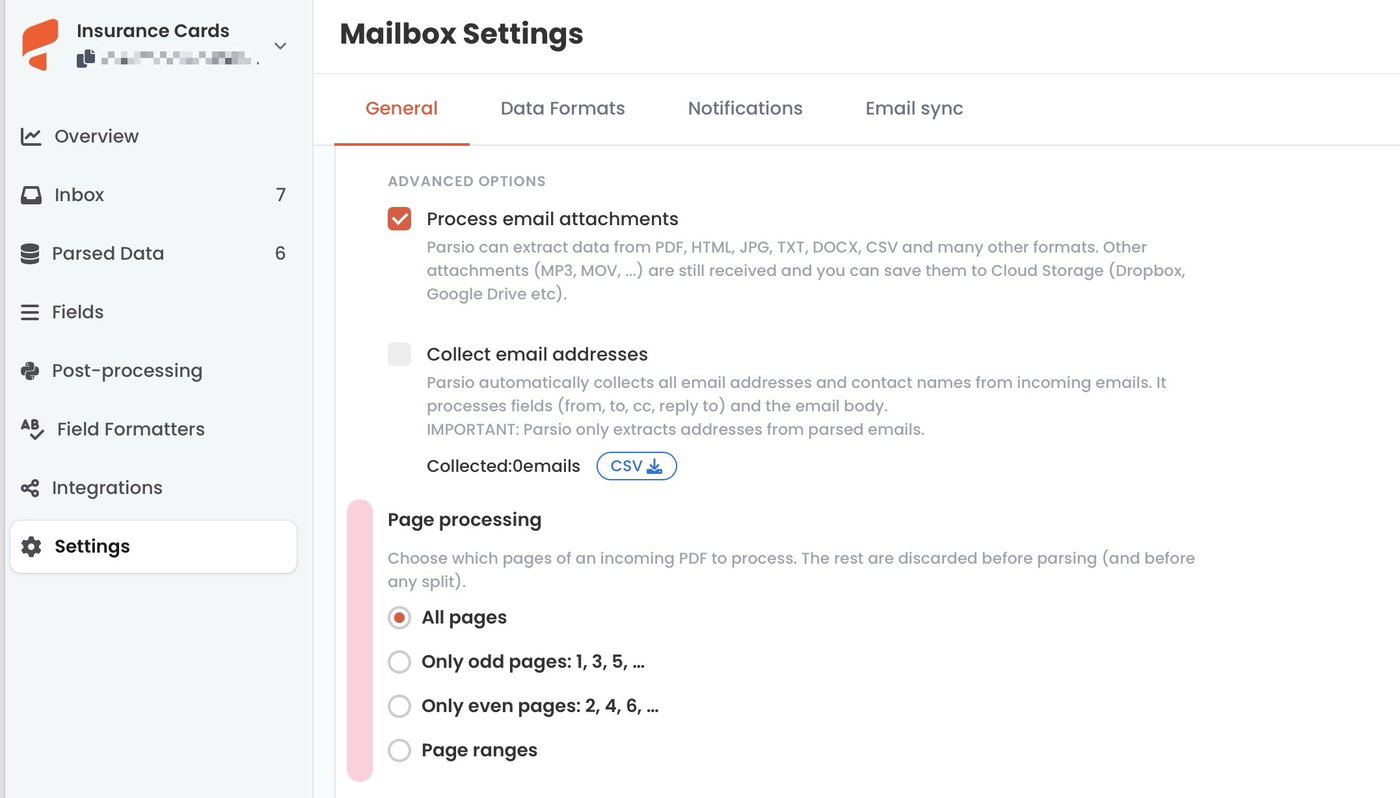
Choose one of four modes:
All pages — default. Every page is processed.
Only odd pages: 1, 3, 5, …
Only even pages: 2, 4, 6, …
Page ranges — keeps only the pages you specify below.
Page ranges syntax
Enter a comma-separated list of pages or ranges:
1— first page only2-5— pages 2 through 5(1)— last page(3)-(1)— last three pages1, 3-5, (1)— pages 1, 3, 4, 5, and the last page
Page numbers are 1-based. Ranges that fall entirely outside the document are ignored.
Credits
Page processing runs before the document reaches any parsing engine. Only the pages that are kept count toward your credit usage — for example, a 10-page PDF filtered down to 3 pages is billed for 3 pages, not 10.
Works with all parser engines
Page processing runs before the file reaches any of Parsio's four parsing engines (AI-powered, GPT-powered, template-based, or OCR), so it applies regardless of which engine your mailbox uses.
Interaction with Document split
Page processing always runs first, before any document split. The split then operates on the already-filtered PDF.